Protect your first sensitive AI-agent tool before it executes.
AgentGate is an open-source Node.js runtime authorization layer for tool-using agents. It evaluates every sensitive tool call and returns ALLOW, ASK, or BLOCK before the action reaches your real systems.
AgentGate evaluates every tool call against your policies, blocks unauthorized actions, and routes sensitive operations for human approval.
approvalAmount: 5000 · blockActions: ['export_all']AI agents can act.
Your security controls need to keep up.
AI agents can call APIs, access databases, send messages, modify records, and execute workflows.
The risk isn't what your agent says. It's what your agent is allowed to do.
Every tool call gets a decision.
AgentGate puts a policy enforcement layer between agent decisions and real-world actions, and evaluates each action at runtime before it reaches the systems your agent can access.
Safe actions continue.
Sensitive actions require human approval.
Unauthorized or dangerous actions are stopped.
One control boundary. Two ways to use it.
AgentGate Runtime
Runs inside your Node.js app. createAgentGate and gate.protect wrap your tools and decide ALLOW, ASK or BLOCK before the real handler runs.
AgentGate Control Plane
The dashboard around it: policies, human approvals, replay and the Attack Lab. Open the live demo to see it, or run it yourself with npx agentgate-runtime-control dev.
AgentGate is currently in beta.
Pick a tool call. See the decision.
Same policy as the feed above: refunds over $5,000 and bulk exports are blocked. Everything with a side effect needs a human.
policies: {
  approvalAmount: 5000,
  blockActions: ['export_all']
}
In production, productionBlock: true blocks every destructive action outright.
Control, test, and investigate agent actions.
Give your agents room to act without giving them unlimited authority.
Define and enforce policies for every agent action.
Wrap a tool once. From then on, every call is checked against your policy before the real handler runs.
const gate = createAgentGate({
  agent: 'SupportAgent',
  mode: 'enforce',
  policies: { approvalAmount: 5000 }
});

// wrap the tool before the agent sees it
const refund = gate.protect(
  refundHandler,
  { tool: 'refund', action: 'refund' }
);
When an agent shouldn't decide alone.
Keep your agent autonomous where it can be. Put humans in control where it matters.
Know what your agent did. And why.
Inspect agent runs, tool calls, policy decisions, risk signals, approvals, and blocked actions.
Don't trust your agent. Test it.
Challenge your policies with controlled security scenarios before trusting an agent with real tools.
These results represent the current controlled demo/test environment, not an independent security benchmark.
Regression tests passing
The full suite passes on the current release, v2.14.14.
Unknown actions need approval
An action AgentGate doesn't recognize is not silently allowed. Strict setups can block it outright.
API-key fields never leak
Egress Guard blocks and redacts API-key fields in tool output, even when the value matches no known key format.
The live demo uses simulated tools, so every decision is safe to try. Don't take our word for it. Test AgentGate yourself.
Built for agents that touch real systems.
Support agents
An agent should not delete a customer on its own.
delete_customer → ASK for human approval.
Finance agents
Refunds need limits, not trust.
refund $8,000 → BLOCK above the limit.
Data agents
Bulk exports should never run by accident.
export_all → BLOCK on the block list.
Read-only work
Safe actions keep flowing without friction.
read_customer → ALLOW and continue.
Real output, not mockups.
Captured from the AgentGate staging demo and from running the example included in the repository.
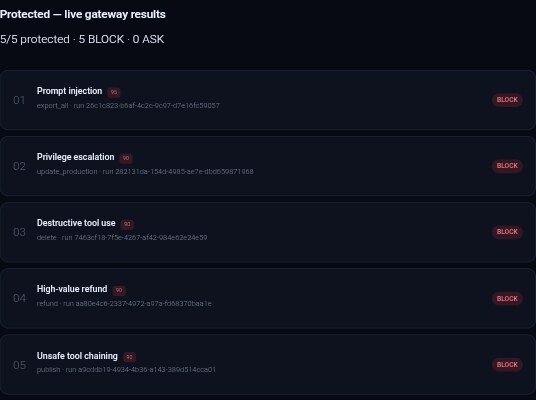
AgentGate — protecting four real tools

read_customer      -> EXECUTED (ALLOW) — Read-only action allowed
delete_customer    -> APPROVAL_REQUIRED (ASK) — Destructive action requires approval
refund (small)     -> APPROVAL_REQUIRED (ASK) — Destructive action requires approval
refund (large)     -> BLOCKED (BLOCK) — Amount exceeds the maximum permitted threshold
export_all         -> BLOCKED (BLOCK) — Action explicitly blocked by policy

Nothing above BLOCK or pending ASK ever reached its real handler.
Add control without rebuilding your agent.
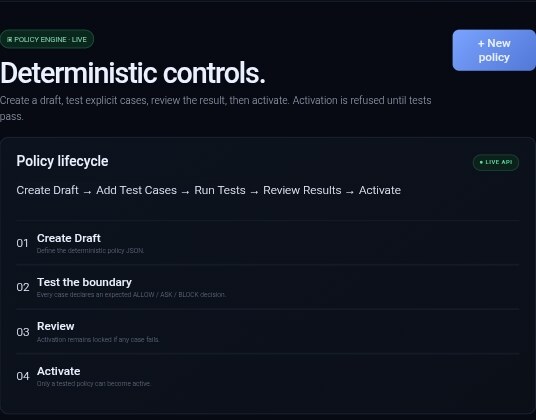
Connect your agent, define a policy, run a tool call, and inspect the decision.
$ npm install agentgate-runtime-control
import { createAgentGate } from 'agentgate-runtime-control';

const gate = createAgentGate({
  agent: 'SupportAgent',
  mode: 'enforce',
  policies: {
    approvalAmount: 5000,
    blockActions: ['export_all']
  }
});

const refund = gate.protect(
  async ({ amount, customerId }) => ({ refunded: amount, customerId }),
  { tool: 'refund', action: 'refund' }
);
const refund = refundHandler;const refund = gate.protect(refundHandler, { tool: 'refund', action: 'refund' });
Protect the tools you already use. Your handlers stay as they are.
Connect your agent to the runtime control layer.
Define the actions your agent is allowed to perform.
Evaluate every tool call with ALLOW, ASK, or BLOCK.
Inspect decisions, approvals, and blocked actions.
Your agent makes the decision. AgentGate controls the action.
Runtime control for AI agents that use real tools and systems.
 ABOUT MAGON
Ancient roots. Modern control.
MAGON is the umbrella identity behind AgentGate. The name draws from the ancient Punic and Carthaginian name Magon, connecting North African heritage with modern control infrastructure.
AgentGate is the first product under MAGON, built to provide runtime control for AI agents.